Common Messages
Umamo tells you what it is doing, and why it did not do something, with short messages. This page lists them by what you were doing, with what each one means and what to do about it. Words in italics stand for a name or a number that Umamo fills in.
How to Read a Message
A message comes in one of four forms, and the form says how much it matters.
- Notices in the status bar
A line in the status bar at the bottom of the window, which disappears by itself after about four seconds. They report the result of something that took a while, such as saving, adding artwork, or generating meshes, and a few explain a problem. See Status Bar and Notices.

The status bar at the bottom of the Umamo Editor window with the notice.
- Notices next to the pointer
A small label that follows the pointer for about three seconds. It explains why a gesture did nothing, such as
Merge needs two or more selected vertices (vertex mode).You do not need to dismiss it.
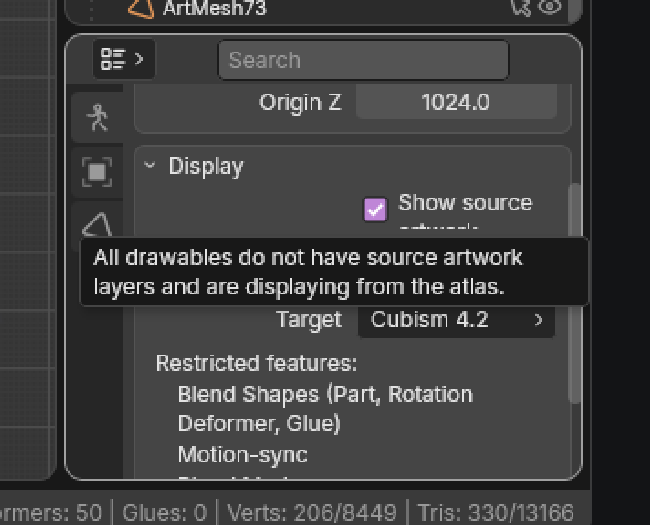
A notice near the pointer for recent actions.
- Alerts
A dialog in the middle of the window that stays until you press its button. Failures that cost you something, such as a file that cannot be opened or saved, and the export report, are alerts. The text of an alert can be selected and copied.
- Questions
A dialog with two or more buttons, which waits for your answer, such as
The document has unsaved changes. Save them first?
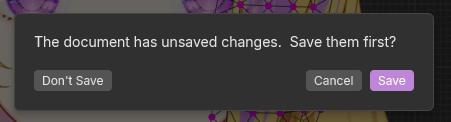
A dialog box asking for user input to confirm actions.
A message such as Something unexpected stopped it; the details are in the log. means that there is more detail in the log. Open the Logs editor, or the log file. See Reporting Bugs.
Opening Files
Opening, importing, and dropping a file report in the status bar while they run. When a file cannot be opened an alert says why.
Message |
What it means |
|---|---|
Opening name… |
A puppet file is being read. It shows in the status bar with a progress bar, and you can keep working. |
Another document is still opening. |
You asked for New or another open while one is still running. Wait for the first one. |
Could not read name. name is not a file format Umamo recognizes. Could not open name. The file may be damaged. Could not import name. Its model3.json manifest was not found next to the file. Could not import name. A texture referenced by its model3.json is missing or unreadable. name has no layers with pixels to import. name was made by a newer version of Umamo and cannot be opened by this one. |
Alerts. The open puppet file is not changed. Read-Only Documents and Open Failures lists each one and what to do. |
name opened read-only. It holds entries this version of Umamo cannot interpret, so Save is unavailable. |
An alert. The puppet file opened, and you can edit and export it, but you cannot save it. See Read-Only Documents and Open Failures. |
The document has unsaved changes. Save them first? The document has unsaved changes. Discard them? The document has unsaved changes. Save them before quitting? The document has unsaved changes. Quit without saving? |
Questions. Umamo asks before it replaces or ends a puppet file with unsaved changes. See Backups and Data Safety. |
Saving and Exporting
These are shown in the status bar unless they say otherwise.
Message |
What it means |
|---|---|
Saving… |
A UMA file is being written. You can keep working. |
Saved name. |
The file is written. |
Saved as UMA. The CMO3’s physics, guides, keyform notes, random pose, model state sets, user data, and other editor settings are not stored in this file. CMO3 exports from this session still keep them, but a CMO3 exported after reopening the file will not. |
The first save of a puppet file that came from a CMO3. Keep the CMO3 if you need that data. See UMA Files. |
Saved as UMA. The MOC3 model’s physics, motions, expressions, user data, and pose files are not supported in this file yet. |
The same, for a puppet file that came from a MOC3. |
A save is already in progress. |
You asked to save while a save was running. Nothing was done. |
Waiting on save to finish… |
You asked to quit or to replace the file while a save was running. Umamo goes on once it is written. |
Exporting model… Exporting image… |
An export is being written. You can keep working. |
Exported name. |
The file is written. If there was anything it could not carry, the export report follows. |
An export is already in progress. |
You asked for a second model export while one was running. Nothing was done. |
Waiting on export to finish… |
You asked for New, Open, or quit while a model export was running. Umamo goes on once it is done. |
Could not save name. reason |
An alert. The file was not written, and the old file is as it was. The reason is the message of the system, such as a full disk or a folder that cannot be written to. |
Could not export name. reason |
An alert. The open puppet file is not affected. See Exporting. |
The file was exported, but the following could not be carried into CMO3: The file was exported, but the following could not be carried into MOC3: |
The export report, an alert. The file has been written. See Export Reports and Notices. |
Exporting will overwrite N existing file(s): names |
A question, before a MOC3 export. Overwrite replaces them, and Cancel writes nothing. |
The viewport renderer could not draw the image. Nothing is visible to capture. width × height px is past the 16384 px limit. |
Image export problems. See Exporting. |
Something unexpected stopped it; the details are in the log. The open document is unaffected. |
An export failed in a way Umamo did not expect. Report it with the log. |
Modes and Editing
Most of these appear by the pointer, because they explain why a gesture did nothing.
Message |
What it means |
|---|---|
Only drawables and warp deformers can be transformed. Parts and rotation deformers are not yet supported. |
You tried to grab, rotate, or scale something else. Select a drawable or a warp deformer. |
Can’t transform while mesh is deformed. Reset all parameters first. |
The parameters are away from their defaults, so the art is deformed. Reset them in the Parameters editor and try again. |
Pose mode needs a deformer to pose. |
The puppet file has no deformers. Create a warp deformer first. See Pose Mode and Keying Lattices. |
Point at a keyable property to insert a keyframe. Select a parameter to key on. |
Insert Keyframe needs a property under the pointer, and a parameter to key it on. See Keyforms. |
Parameter deleted. N object(s) now look different at the default pose. |
A parameter was deleted, and what it drove collapsed to its look at the default. Undo if that was not what you meant. |
Merge needs two or more selected vertices (vertex mode). Connect needs exactly two selected vertices (vertex mode). |
Select the vertices first, in vertex select mode. See Meshes. |
Can’t connect: The cut crosses nothing, or the geometry is degenerate. |
The two vertices cannot be joined by an edge that crosses a face. |
Nothing to rip here: The selection has no fan to split. |
Rip needs a vertex where several faces meet. |
Nothing to edit, every selected drawable is hidden by a parent. |
Edit Mode has no geometry to show, because the parts or deformers above the selection are hidden. |
Rotation deformers can’t be edited yet. |
Select a warp deformer. |
This warp deformer has no lattice to edit. This warp deformer is not drawn at the default pose, so its lattice cannot be edited. |
Edit Mode edits a warp’s lattice at rest. See Deformers. |
A lattice’s points can be moved, but not added, merged, or connected. Change its rows and columns instead. |
You ran a command that changes how a mesh is connected, such as Merge, Connect, or Rip, on a lattice. Moving the points of a lattice is allowed. Use Subdivide Lattice or the Rows and Columns fields to change its resolution. |
The reshaped lattice folds or collapses at N object(s) under it, so their art has moved. |
The new lattice crosses itself over art that sits in it. Check the art. |
The lattice was rebuilt as a close approximation, so its motion may differ slightly. Check it and adjust if needed. The lattice was rebuilt as a close approximation, so its motion may differ slightly. N object(s) under it could not keep their place, so their art has moved. |
Changing the resolution of a lattice that is keyed has to resample its keyforms. Look at the motion afterwards. |
name was moved to its new parent but could not keep its place: The new deformers could not map its position. N object(s) were moved to their new parent but could not keep their place: The new deformers could not map their positions. |
Keep in Place could not hold the object where it was under its new parent. Move it by hand. |
Proportional editing on. Proportional editing off. Proportional editing: Connected only. Proportional editing: All within radius. |
Confirmations of a toggle. See Proportional Editing. |
The selection has no editable UVs. Nothing is selected to mirror. |
A UV Editor command needs a selection that has UVs. See Editing UVs. |
Nothing to edit here. None of the meshes you are editing are on the page or layer being shown. |
The UV Editor shows another page or layer than the meshes you are editing. See Texture Selector. |
The puppet’s UVs address the source artwork and not the atlas so there is no placement to move. Nothing selected is packed on an atlas page or there is no source artwork. Show an atlas page in the UV editor to move placements. Nothing selected is packed on this page. The atlas cannot be recomposed from its source art, so placements cannot move. |
Moving art on its page needs an atlas page on show, and art that is packed on it. See Art Placement. |
Placement overlaps another tile. Repack the atlas to clear the collision. Placement extends past the page edge. The overhang is cropped. |
The tile was moved to a place where it overlaps another, or leaves the page. Move it, or repack. |
Selected tile is pinned. Unpin it to transform it. |
A pinned tile does not move. See Art Placement. |
Some drawables have no source artwork and are still displaying from the atlas. All drawables do not have source artwork layers and are displaying from the atlas. |
You asked to display source artwork, and some or all of the drawables have none. |
Action unavailable. |
Umamo refused the action and has no more to say. Report it if it surprises you. |
Artwork and Sources
Importing, reloading, relinking, and matching artwork, generating meshes, and repacking the atlas report in the status bar. Some of them, such as the ones about skipped meshes, have a longer list in the log. See Importing Artwork, Reloading and Relinking, and Sources.
Adding Artwork
Message |
What it means |
|---|---|
Adding name… |
Artwork is being read, meshed, and packed. A progress bar shows it. |
Artwork added. |
It worked. |
Artwork imported with notes. |
The artwork was added, and the import has things to tell you, such as a layer that was skipped. The log lists them. |
The document changed while the artwork was being added; nothing was applied. |
You edited the puppet file during the import, and Umamo dropped the result rather than mix them. Add the artwork again. |
Artwork can’t be added to a document created from a MOC3 file. Export the document as CMO3, import that file, and then add the artwork. |
A MOC3 has only baked atlas pages. See Cubism Interchange. |
The file has no layers with pixels to add. |
Every layer of the file is empty, or has no pixels. |
Reloading, Relinking, and Matching
Message |
What it means |
|---|---|
Artwork reloaded: N updated, N added, N matched. |
A reload finished. When some layers need your decision, the message adds |
Artwork reloaded: N updated, N added, N matched, N need review. |
Some layers went missing or were renamed. They are marked for review in the Sources editor, and are not dropped. |
…some layers now reach past the edges of their meshes. |
Reloaded, relinked, matched, or replaced art grew beyond the mesh over it. Run Generate Mesh from Art on those drawables. See Generating Meshes from Art. |
The artwork file(s) have not changed. No artwork file could be read; nothing was reloaded. |
Nothing to reload, or the files are missing. Check where they are. |
N artwork file(s) changed on disk. Press Reload to take the changes. |
The watcher noticed the change. See Watching Artwork Files. |
N artwork file(s) changed since they were last read. Press Reload to take the changes. |
The same, found when the puppet file was opened. |
name is no longer where the document read it. |
The file was moved or deleted. Relink or replace it. |
Art relinked and reloaded. Art relinked; its file could not be read, so the art did not change. Art relinked; its file could not be read, so the document’s copy of the layer was used. |
The result of a relink. The last two mean that the file was not read. |
N layer(s) matched, N left for review. |
The result of Match Automatically. |
No artwork could be read, from its file or from this document; nothing was matched. |
There was nothing to match with. Check the files. |
No binding matched confidently enough; the suggestions are on the rows that need review. |
The suggestions are on the rows that need review in the Sources editor. |
Nothing left to match against: every candidate layer is already bound. Adjust Match Threshold on the reload’s strip, or relink manually. |
Every layer already has art. |
Artwork replaced: N layer(s) reloaded by key, N matched, N left for review. |
The result of Replace Artwork. |
Generating Meshes
These appear in the status bar and by the pointer.
Message |
What it means |
|---|---|
Generated N mesh(es) from art. |
It worked. |
…N skipped. |
Some drawables got no mesh. The log says why. |
…N built coarser than asked to stay within the vertex budget. |
The mesh needed more vertices than the budget allows, so the spacing was made larger. |
…N had to be redone with a higher vertex budget or with holes filled. |
The art could only be meshed with a larger budget, or with the holes filled. |
…N skipped because pinned art has no room to grow. Unpin the art or lower the margin. |
The mesh would extend past the page, and the art is pinned. |
…N skipped because they need more than 4096 vertices even with holes filled. Raise the Alpha Threshold or lower the Minimum Outline Points. |
The art is too complicated, such as many specks. |
…N skipped because most of their vertices are glued to other meshes, and regenerating would change how they follow them. |
Meshes that glue depends on are left as they are. |
No mesh was generated. |
Nothing could be generated. |
Nothing was generated: The atlas has no room for the larger meshes. |
A larger mesh needs more room on its atlas page than there is. |
The document changed while the meshes were being generated, so none were applied. |
You edited during the run. Run it again. |
Select a drawable with a mesh to generate one from its art. |
Select the drawables first. |
See mesh for the same mesher on the command line, where each of these reasons is in the report.
Repacking the Atlas
Message |
What it means |
|---|---|
Atlas repacked. |
It worked. |
Atlas already packed; nothing changed. |
The result would be the same as what is there. |
Repack canceled: the atlas changed while packing. |
You edited during the repack. Run it again. |
The atlas was not repacked. These tiles could not be packed: |
An alert with a list. Drawable mesh is larger than the atlas page size. Source artwork layer has no opaque pixels. Source artwork layer is below the minimum opaque coverage. Source artwork layer could not be decoded. Drawable’s current placement could not be inverted. Pinned placement does not fit inside the maximum page size. Fix or remove those, or raise the maximum page size. See Atlas Packing. |
Memory
Message |
What it means |
|---|---|
Umamo has been allocated to use at most limit of memory. Large files, especially exports, can cause Umamo to run out of memory and crash. To allocate up to 50% of the system memory for Umamo: Quit and run this command from a terminal: command |
An alert at launch, for a |
Could not export name: Umamo ran out of memory. The open document is unaffected. |
An alert. The export stopped. For a |
There was not enough memory for a width × height px image. Try a smaller scale. |
An alert from Export Image. |
Other Messages
Message |
What it means |
|---|---|
Umamo version is available. You have version. |
A question from the update check. Open Download Page, Later, or Skip This Version. See Updating Umamo. |
You have the latest version of Umamo, version. No release of Umamo has been published yet. |
The result of . |
Could not check for updates: reason |
An alert. Usually the network. |
Could not open the log folder. The session logs are in: folder |
An alert. Open the folder yourself. |
Reset this workspace to its default layout? Replace all workspaces with the imported file? |
Questions. See Workspaces. |