Cubism Interchange
Umamo works with the CMO3 and MOC3 model formats of Live2D Cubism, so that a model can be brought into Umamo from the Cubism Editor, worked on, and then sent back out. It imports them into a new document and exports a new file from the open document, and the original file is never modified.
Roles of Each Format
Format |
What it is |
In Umamo |
|---|---|---|
UMA |
Umamo’s own document. |
Open and Save. See UMA Files. |
CMO3 |
The project file of the Cubism Editor. It holds the model, the layered artwork it was made from, and the editor’s own settings. |
Import and Export. |
MOC3 |
The baked model that an application plays. It holds only the puppet geometry and the texture atlas pages. |
Import and Export, together with its sidecar files. |
A CMO3 is the source project and a MOC3 is the finished model that an application plays. The Cubism Editor produces a MOC3 from a CMO3 and Umamo can export either one from the open document.
A MOC3 comes with a group of files which are referred to as sidecars. Besides the .moc3 file, there is a .model3.json manifest that lists the others, a .cdi3.json file with the display names of the parameters and parts and how the parameters are grouped, the texture pages as PNG images, and, when the model has them, physics, pose, expression, motion, and user data files. Umamo reads and writes the group as a whole.
Umamo is not affiliated with Live2D Inc., and its support for these formats was worked out by observation. See Legal.
Importing
Importing a model replaces the open document with a new document made from the file. If the open document has unsaved changes you will be asked to save first. The imported file is not changed and the new document is not linked to it. The first Save asks where to put an UMA file and suggests the name of the file that you imported.
The status bar shows the progress while a large model is read. A file that cannot be imported leaves the open document as it was and shows an alert. See Read-Only Documents and Open Failures.
Import can be accessed from the File menu or from the command palette as Import CMO3… and Import MOC3….
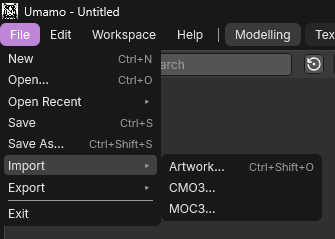
The Import submenu of the File menu.
Import CMO3
Reference
- Menu:
What comes in:
The parameters, with their groups, their order in the panel, and their linked pairs.
The parts, the warp and rotation deformers, and the drawables with their meshes, keyforms, masks, and draw order.
Blend shapes and glue.
The canvas and the texture atlas, as the file stored them.
The layered artwork inside the file, as the source artwork of the document. Reload and Relink can use it even when the original artwork file is not where Cubism recorded it. See Reloading and Relinking.
The Runtime Target, taken from the Cubism version that the file was saved for. See Runtime Targets and Cubism Versions.
Umamo keeps the data that it cannot edit, such as physics, guide images, keyform notes, the random pose, model state sets, user data, and the other settings of the Cubism Editor. Export CMO3 writes them back as long as the document stays open. An UMA file does not store them at this time. See UMA Files.
A parameter, parameter group, part, deformer, or drawable that was saved with an empty name shows its ID as its name.
Import MOC3
Reference
- Menu:
Import MOC3 asks for a .moc3 file. A MOC3 is only part of a model, so Umamo looks for the sidecars in the folder next to the .moc3.
File |
Needed |
Without it |
|---|---|---|
|
Yes |
The import stops with |
The texture pages that the manifest lists |
Yes |
The import stops with |
|
No |
The model comes in without display names, parameter groups, or linked parameters. Everything is named by its ID. |
Physics, pose, expression, motion, and user data files |
No |
Nothing is carried over to a later export. |
What comes in is the baked model: Its parameters, parts, deformers, drawables, meshes, keyforms, blend shapes, glue, masks, and its texture pages as the atlas. A MOC3 stores no names for deformers, so each one is named after the drawable that it deforms where that is unambiguous. For example, Warp40 (ArtMesh5).
The physics, pose, expression, motion, and user data files are kept as they were and written out unchanged by Export MOC3. Umamo does not edit them. The groups and hit areas of the manifest are kept in the same way.
A MOC3 has no layers, so the document has no source artwork. Adding artwork to it is refused with the notice Artwork can't be added to documents created from imported MOC3 files. Export a CMO3 first, import that file, and add the artwork there.
Compatible Cubism Versions
Umamo reads and writes CMO3 files and is tested with Cubism Editor 4.2 to 5.4. It reads and writes MOC3 files from version 1 to version 6, which are the models of Cubism 3.0 to 5.4. See Runtime Targets and Cubism Versions for the version that each Runtime Target uses.
The Runtime Target of the document decides what an export writes when exporting a MOC3 file.
A newer version of Cubism may add something that Umamo does not know about. If that happens, open an issue on GitHub that describes the problem and includes a sample file. See Reporting Bugs.
Exporting CMO3
Export CMO3 writes a project that the Cubism Editor can open. How it is built depends on where the document came from:
The document came from |
The CMO3 is built from |
|---|---|
A CMO3 |
A fresh copy of the original file’s contents with your edits applied on top. Everything that Cubism stored and Umamo does not edit is written back. A document without edits exports its model unchanged. |
Artwork |
The model. The real layers and folders of the artwork are written into the file, and every drawable keeps its layer binding. |
A MOC3 |
The model, with a stand-in source rebuilt from the atlas pages. Each layer is a slice of a baked page and not the artwork the model was drawn from. The file opens and renders in the Cubism Editor, and the export report notes this. |
An UMA file, or a new document |
The model. Anything that Cubism stored and the UMA file does not carry is absent. |
Export CMO3 never changes the open document or the original file. Anything that the CMO3 format does not support will be listed in the export report. See Exporting for the dialog and Export Reports and Notices for the report.
Exporting MOC3
Export MOC3 bakes the open document into a MOC3 and its sidecar files. Whatever the document came from, the MOC3 is baked fresh from the model, so it is not byte-for-byte the same as the file that you imported.
The MOC3 format version follows the Runtime Target. Any feature that the version does not support is stripped from the exported file, and the export report will list it. See Runtime Targets and Cubism Versions.
An options dialog lets you choose whether hidden objects and guide images are written, which sidecar files are included, and the scale. See Exporting.
What Round-Trips and What Does Not
Staying within the same format loses the least:
A CMO3 that is imported and exported in the same session keeps everything it had, including the parts that Umamo does not edit.
A MOC3 that is imported and exported keeps its rig, texture pages, physics, pose, expression, motion, and user data files. The
.moc3file itself is baked again.
Changing format or session loses anything that the new format or session does not carry:
UMA. An UMA file does not carry the data that only Cubism knows, so a CMO3 exported after reopening the document lacks it. See UMA Files.
MOC3 to CMO3. The CMO3 has no original layers, only slices of the atlas pages, and names come from the
.cdi3.jsonfile.CMO3 to MOC3. A MOC3 has no layers and no editor settings. Hidden objects and guide images are left out unless you turn them on. A feature newer than the Runtime Target is stripped. A MOC3 stores one keyform grid for each object, so a channel keyed over a narrower span is written as a constant. An ID longer than 64 bytes is shortened, and a mesh with more than 65,536 vertices is left out.
Anything to CMO3. Some edits cannot be stored in a CMO3, such as a fractional draw order or a fractional canvas size.
Each of these is listed in the export report when it happens. Read it before you rely on the file.