Export Reports and Notices
Sometimes an export can’t write out everything that was request of it. When a CMO3 or MOC3 cannot export something from the open document, or when the export had to change something to fit the format, Umamo tells you in an export report. Nothing is dropped silently. This page explains how to read a report and what each line means.
Reading a Report
The report opens as an alert once the file has been written. Its first line says which format was exported and each line after it is one notice:
The file was exported, but the following could not be carried into MOC3:
• [Drawable] ArtMesh7: The drawable is hidden and the export options omit hidden drawables, so it was left out.
• Multiply Color is not available for the target runtime version, so it was removed from: ArtMesh3, ArtMesh9.
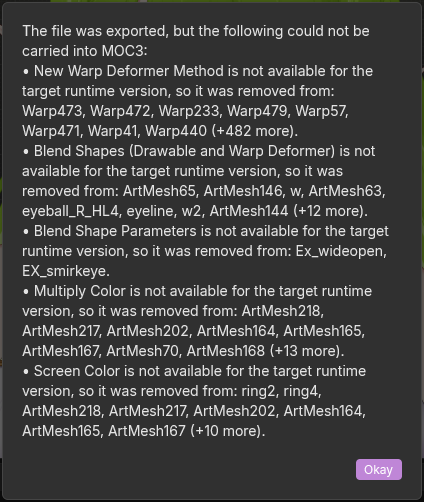
An export report.
A notice about a single object starts with the category of the object in brackets, followed by its ID and then the reason. For example, [Drawable] ArtMesh7: …. A notice about the whole document has no ID, and a notice about a sidecar file shows the name of the file in place of an ID.
Three kinds of notices have no category:
Notice |
What it means |
|---|---|
Feature is not available for the target runtime version, so it was removed from: names. |
A MOC3 export stripped a feature from the file because the MOC3 format version of the Runtime Target does not support it. The list shows up to eight names and then |
Base geometry or UVs were edited on: drawables. The export keeps them as authored, but editing those meshes or their atlas in the Cubism Editor may re-derive and corrupt the UV mapping. |
A CMO3 export. Cubism ties the geometry and the UVs of a mesh together and you have edited them in a way that breaks that tie. The export file contains what you made. Avoid editing those meshes or their atlas in the Cubism Editor as it may cause it to break. |
This model has no source artwork, such when a document was created from an imported MOC3, which stores only packed texture atlases. A stand-in source document was rebuilt from the N atlas page(s), … |
A CMO3 export from a document that came from a MOC3. The file has the full rig and opens in the Cubism Editor, but every layer is a slice of a baked atlas page and not the artwork the puppet was drawn from. To get real, editable layers, import the CMO3 and add the original layered artwork to it. See Reloading and Relinking. |
Every notice is also written to the log, with the prefix export:. See Logs. The text of the alert can be selected and copied, so you can paste it into a bug report. An export with nothing to report shows no alert.
Categories
The category names the kind of object that a notice is about, which also tells you which editor area to inspect. Each table lists the reasons that belong to one category. Reasons that appear in several categories are described in Common Reasons, and the tables point there.
Parameter
The subject is the ID of a parameter.
Export |
Message |
What it means |
|---|---|---|
CMO3 |
A parameter’s kind change(normal/blend shape) is not lowered. |
The parameter was changed between a normal parameter and a blend shape parameter. |
CMO3 |
The physics settings names still point to this deleted parameter. They were written unchanged; retarget or remove them. |
You deleted a parameter that the physics still point to in the data. |
Also seen here: No matching source, Created in Umamo, and Ids too long for a MOC3.
Parameter Group
The subject is the ID of a parameter group.
Export |
Message |
What it means |
|---|---|---|
CMO3 |
The created group is not in the edited parameter tree, so it was not synthesized. |
A group that you created is not part of the tree of the parameters panel, so it was not written. |
Also seen here: No matching source and Created in Umamo.
Part
The subject is the ID of a part.
Export |
Message |
What it means |
|---|---|---|
MOC3 |
A clipping mask names a drawable that could not be written, so it was dropped from the part composite. |
An isolated part is masked by a drawable that is not in the export, so the part is no longer masked by it. |
CMO3 |
The static draw order is shadowed by its keyform track, so CMO3 cannot store it independently. |
The part has a keyed draw order. CMO3 cannot also keep a separate fixed value. |
CMO3 |
The composite’s static values are shadowed by the part’s keyform tracks, so CMO3 cannot store them independently. |
The same, for the fixed values of the composite of an isolated part. |
CMO3 |
Part-typed composite masks flatten to their descendant drawables in CMO3. |
A part that masks another is written as the drawables inside it. |
Also seen here: No matching source, Created in Umamo, One grid for each object, Whole numbers only, and Ids too long for a MOC3.
Deformer
The subject is the ID of a deformer.
Export |
Message |
What it means |
|---|---|---|
MOC3 |
A warp deformer with no control-point grid has no lattice to write. One empty lattice was written in its place so the file stays readable, and everything bound to this deformer collapses to the origin. |
The warp has no lattice. Give it one, or delete it. |
MOC3 |
A rotation deformer with no pivot grid has no transform to write, so the identity transform was written in its place. |
The rotation deformer has no pivot, so it does nothing in the runtime. |
CMO3 |
A deformer’s kind change is not lowered. |
The deformer was changed between a warp and a rotation deformer. The CMO3 keeps the kind that it had. |
CMO3 |
The CMO3 source is not a warp deformer, so warp-only edits(bilinear mode, lattice, keyforms) were not written. |
You edited a property that only a warp deformer has, on a deformer that is not a warp in the original file. |
CMO3 |
The CMO3 source is not a rotation deformer, so rotation-only edits(base angle, keyforms) were not written. |
The same, for a property that only a rotation deformer has. |
CMO3 |
There is no CMO3 part to move the deformer to, so its part was left unchanged. |
You moved the deformer into a part that the original file does not have. |
Also seen here: No matching source, Created in Umamo, One grid for each object, and Ids too long for a MOC3.
Drawable
The subject is the ID of a drawable.
Export |
Message |
What it means |
|---|---|---|
Both |
A drawable with no mesh cannot be written. |
Give the drawable a mesh. See Generating Meshes from Art. |
MOC3 |
A guide-image (sketch) part is not runtime content, so it was left out. |
The drawable is inside a guide image part. Turn on Export sketch parts to write it. |
MOC3 |
The part is hidden and the export options omit hidden parts, so its contents were left out. |
Turn on Export hidden parts to write it. |
MOC3 |
The drawable is hidden and the export options omit hidden drawables, so it was left out. |
Turn on Export hidden drawables to write it. |
MOC3 |
The mesh has N vertices, past the 65536 limit of a 16-bit triangle, so it was left out. |
A MOC3 cannot address more than 65,536 vertices in one mesh. Use a coarser mesh. |
MOC3 |
No atlas page is bound to this drawable, so it was written pointing at page 0. |
The drawable is not on any texture page. It draws whatever is at its UVs on page 0. |
MOC3 |
The clipping mask ids is not in this export, so the mesh was written unclipped by it. |
The drawable is masked by drawables that were left out. It is no longer clipped by them. |
CMO3 |
Texture-source rebinding is editor-only state and is not written to CMO3. |
Which texture a drawable draws from is not stored in the CMO3. |
CMO3 |
This drawable was bound to different artwork, which needs the artwork re-imported rather than repacked. |
You pointed the drawable at another piece of art. Import the artwork again. |
CMO3 |
The base geometry does not match the CMO3 source’s vertex count, so it was not written. |
The mesh no longer has the number of vertices that the original has. |
CMO3 |
The drawable has no UVs to reconcile, so none were written. |
The drawable has no UV coordinates. |
CMO3 |
This drawable has no texture input for the chosen display mode, so it keeps the one it had. |
The Cubism Editor’s display of source artwork could not be set on this drawable. |
CMO3 |
Keyforms without a base mesh cannot be bundled into CMO3. |
The drawable has keyforms and no mesh. |
CMO3 |
The mesh has N vertices, past the 32767 the editable mesh’s edge table can index, so the edge table was not rebuilt. |
A mesh with more than 32,767 vertices cannot have its edges rebuilt in a CMO3. |
CMO3 |
The created drawable has no texture source to clone, so it was not synthesized. |
A drawable that you created has no art to base its CMO3 image on. |
Also seen here: No matching source, Created in Umamo, One grid for each object, Whole numbers only, and Ids too long for a MOC3.
Glue
The subject is the ID of a glue.
Export |
Message |
What it means |
|---|---|---|
MOC3 |
A glue naming a drawable that is not in this export was dropped. |
One of the drawables the glue joins was left out of the export. |
CMO3 |
A glued drawable has no CMO3 source, so the glue was not synthesized. |
A glue to a drawable that you created cannot be written. |
CMO3 |
A glued mesh has no editable-mesh vertex-id table, so the glue could not be re-bound. |
The glue cannot find the vertices it joins in the file. |
CMO3 |
A glue pair indexes past its mesh’s vertex-id table, so the glue was not re-bound. |
The glue names a vertex that the mesh does not have. |
CMO3 |
A static glue intensity with no keyforms has nowhere to live in CMO3. |
The glue intensity is set, but not keyed. |
Also seen here: No matching source, Created in Umamo, One grid for each object, and Ids too long for a MOC3.
Document
A notice about the document as a whole has no ID. A notice about a sidecar file has the name of the file.
Export |
Message |
What it means |
|---|---|---|
MOC3 |
File names parameters this export does not contain (ids). It was written unchanged, so a runtime finds nothing for those inputs and outputs. |
A physics, expression, or motion file that was carried through names a parameter that you deleted, or one whose ID was shortened. |
MOC3 |
File names parts this export does not contain (ids). It was written unchanged, so a runtime finds nothing to switch or fade for them. |
The same, for parts. The parts were deleted, are inside a guide image part that the export leaves out, or had their IDs shortened. |
CMO3 |
CMO3 stores no authored world origin, so reopening the file derives it from the canvas center. |
If you moved the world origin, it returns to the center of the canvas. |
CMO3 |
The model has no root parameter group, so the parameter tree was not rebuilt. |
The model has no parameter group at the top to rebuild the parameters panel’s tree from. |
CMO3 |
The model has no root part, so the parts panel order was not rebuilt. |
The same, for the parts panel. |
CMO3 |
The model has no parameter set, so the parameter order was not written. |
The CMO3 has no list of parameters to hold the order. |
CMO3 |
The parameter order was adjusted so the combined pair a + b stays adjacent. |
CMO3 needs two linked parameters next to each other, so Umamo moved them. |
CMO3 |
The model has no canvas, so the canvas size was not written. |
The document has no canvas. |
CMO3 |
CMO3 stores whole canvas pixels, so the fractional canvas size was not written. |
Set the canvas to whole pixels. |
CMO3 |
This document has no texture manager, so the source-artwork display mode could not be written. |
The CMO3 has no texture manager, which is what holds the Cubism Editor’s source-artwork display mode. |
CMO3 |
This artwork is not packed onto any atlas page, so there was no placement to update. |
You moved artwork that is not on a page. |
CMO3 |
This artwork was moved on its atlas page, but the page image still shows it at its old spot; repack to redraw it. |
The placement was written, and the picture on the page was not redrawn. Repack the atlas to redraw it. See Atlas Packing. |
CMO3 |
This artwork’s pixels, name, or size changed, which an atlas placement cannot carry; re-import the artwork instead. |
Reload the artwork rather than repack it. See Reloading and Relinking. |
CMO3 |
This artwork is bound to layer layer of file, which the document does not list, so the binding could not be written; the CMO3 carries the artwork as a flat image of its own. Relink it in the Sources space to export the binding. |
The art is bound to a layer of a file that is not in the Sources editor. The art itself is written. Relink it. See Sources. |
Also seen here: No matching source.
Keyform
The subject is the object that owns the keyforms, such as a drawable or a part.
Export |
Message |
What it means |
|---|---|---|
CMO3 |
The grid axis parameter id has no CMO3 source, so the keyform grid was not written. |
The grid is keyed on a parameter that you created. |
CMO3 |
The blend-shape parameter id has no CMO3 source, so the blend shape was not written. |
The blend shape is driven by a parameter that you created. |
Common Reasons
No matching source
There is no matching CMO3 source to reconcile against, so the change was not written. A CMO3 export from a document that came from a CMO3 applies your edits to the original file’s own objects. This notice means that the object you edited has no counterpart in the original, so there was nothing to apply the edit to.
Created in Umamo
The CMO3 model has no set of this kind to create into, The newly created entity has no CMO3 source yet, and the other messages that mention a created entity. A CMO3 export from a document that came from a CMO3 builds new objects for the things that you made in Umamo. When it cannot, because the original has no place for that kind of object, the object is not written or is written without a place in the panel order.
One grid for each object
… is keyed over a narrower span than the object’s grid, so it was written as a constant. MOC3 stores one grid per object. … CMO3 stores one grid per object. A MOC3 or a CMO3 keeps the geometry of an object and its opacity, colors, and draw order in a single grid. If one of them is keyed over a smaller span than the others, it cannot be written as it is. A MOC3 writes it as a constant. A CMO3 reports the keys that would not fit:
Keys outside the geometry’s keyed span cannot be bundled into one grid.
Channel keys with no geometry cannot be bundled into one grid.
Keys outside the channel track’s span cannot be bundled into one grid.
IDs too long for a MOC3
The ID does not fit a moc’s 64-byte id record, so it was written truncated to … A MOC3 stores IDs in records of 64 bytes. A longer ID is cut to fit. If the cut ID is the same as another object’s, a suffix is added to keep them distinct. The .cdi3.json file uses the new IDs. A sidecar file that was carried through unchanged still has the old ones, and is reported under Document.
Whole numbers only
CMO3 stores a whole-number draw order, so the fractional value was not written. A CMO3 holds the draw order of a drawable or part as a whole number, and the canvas size in whole pixels. Use whole numbers.
Left out by your options
A MOC3 export leaves out hidden parts, hidden drawables, and guide image parts unless you turn them on in the options. Each object that was left out is reported under Drawable. See Exporting.
See also