Runtime Targets and Cubism Versions
Every target runtime version can play a different set of features. A model that uses a feature that an older runtime lacks may play incorrectly there or not at all. The Runtime Target of a document says which runtime the model is intended to play on. When a runtime target is selected Umamo will hide the features and controls that the runtime cannot play. When you export to MOC3 it writes the format version for that runtime.
What a Runtime Target Is
The Runtime Target is a document setting and is saved into it. This is the same as the “Select Target Version” in the Cubism Editor.
A target limits what you can author. It does not delete any existing authored features:
It only hides or limits controls. A model that already uses a feature the target lacks keeps the feature and keeps rendering in Umamo.
An UMA file and a CMO3 file always carry every feature.
Only a MOC3 export will strip features that are incompatible with the selected runtime target and only in the exported files.
Choosing a Target
The Target list is in the Runtime section of the Document tab of the Properties editor. See Document Tab. Changing it is an undoable step that the History editor labels Set Runtime Target.
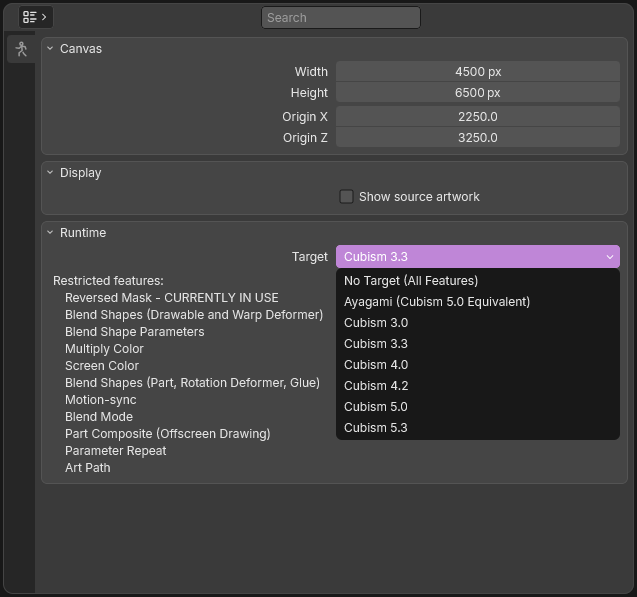
The Runtime section of the Document tab.
The starting target depends on where the document came from:
A CMO3 starts with the target the file was saved for, or with No Target (All Features) when it was saved for the latest Cubism.
A MOC3 starts with the target that matches its version.
An UMA file starts with the target that it was saved with.
A new document and a document made from artwork starts with No Target (All Features).
Below the list, Umamo names the features that the chosen target restricts, or says All features are available. A restricted feature that your document already uses is marked CURRENTLY IN USE, so that you can see what a MOC3 export would remove.
Target List
Target |
MOC3 version written |
Cubism Editor Version |
Notes |
|---|---|---|---|
No Target (All Features) |
6 (Latest Version) |
— |
No restrictions. The MOC3 version is written out as the latest. |
Ayagami (Cubism 5.3 Equivalent) |
6 |
5.3 |
Free, Open Source Runtime - Ayagami |
Cubism 3.0 |
1 |
3.0 to 3.2 |
Proprietary Runtime - Requires a Live2D SDK License |
Cubism 3.3 |
2 |
3.3 |
Proprietary Runtime - Requires a Live2D SDK License |
Cubism 4.0 |
3 |
4.0 |
Proprietary Runtime - Requires a Live2D SDK License |
Cubism 4.2 |
4 |
4.2 |
Proprietary Runtime - Requires a Live2D SDK License |
Cubism 5.0 |
5 |
5.0 |
Proprietary Runtime - Requires a Live2D SDK License |
Cubism 5.3 |
6 |
5.3 |
Proprietary Runtime - Requires a Live2D SDK License |
Gated Features
Each feature is available starting with the listed target. The names here are the ones shown in the Properties editor.
Feature |
Available from |
What it covers |
|---|---|---|
New Warp Deformer Method |
Cubism 3.3 |
The bilinear way of interpolating a warp deformer. |
Reversed Mask |
Cubism 4.0 |
Inverting a mask. |
Blend Shapes (Drawable and Warp Deformer) |
Cubism 4.2 |
Blend shapes on a drawable or a warp deformer. |
Blend Shape Parameters |
Cubism 4.2 |
The parameters that drive blend shapes. |
Multiply Color |
Cubism 4.2 |
The multiply color of drawables, deformers, and part composites. |
Screen Color |
Cubism 4.2 |
The screen color of the same objects. |
Blend Shapes (Part, Rotation Deformer, Glue) |
Cubism 5.0 |
Blend shapes beyond drawables and warp deformers. |
Motion-sync |
Cubism 5.0 |
Umamo does not support the Cubism Motion-sync feature so this is for informational purposes only. |
Blend Mode |
Cubism 5.3 |
The blend modes added in 5.3 and the alpha blend modes. |
Part Composite (Offscreen Drawing) |
Cubism 5.3 |
Isolated parts, which draw into an offscreen buffer. |
Parameter Repeat |
Cubism 5.3 |
Parameters that repeat. |
Art Path |
No Target |
Umamo does not support this feature and it is for informational purposes only. This is an editor only feature from the Cubism Editor and is not supported by any runtime. |
What Gating Does and Does Not Do
What a restricted target does in the editor:
Controls for a whole feature are hidden. The Multiply Color and Screen Color rows, the invert-mask row, the bilinear option of a warp deformer, and the composite rows of an isolated part are not shown. Add Blend Shape Parameter is also missing from the Parameters editor’s menus.
Lists of choices are reduced to what the target supports. The blend modes and alpha blend modes are limited to the older ones and Isolated is no longer offered as a group mode.
A new warp deformer is created with the older method.
When the model has a value selected that is not supported by the current runtime, a control that would normally be hidden will remain visible. Changing the value from an unsupported value will then hide the control. For example, if Group Mode Isolated is selected while a runtime target lower than 5.3 is selected, the Isolated value will remain visible until it is changed to another supported value.
What it does not do:
It never stops a model from rendering. A document that uses features beyond the target still renders in full.
It never removes anything from the document and it never stops a save to UMA or an export to CMO3.
A MOC3 export is the only place where a target removes anything. It writes a file compatible with the target version and strips any unavailable features. The export report will list anything that was removed from the export. For example, a line of the report reads Multiply Color is not available for the target runtime version, so it was removed from: followed by a list of the items it was removed from. See Export Reports and Notices.